Adobe Campaign to Bloomreach: a step-by-step migration plan
Moving from Adobe Campaign v8 to Bloomreach Engagement is less about copying campaigns and more about rethinking your data. Here is the plan we would follow.
 Thibault Heyde
In short
- The hard part is the data model, not the emails.
- Treat the migration as a clean-up: retire what nobody uses.
- Plan warm-up and a parallel run before you set a cut-over date.
Most teams that ask us about leaving Adobe Campaign v8 for Bloomreach Engagement start with the same question: how long will it take to move our campaigns? It is a fair question, but it is the wrong place to start. The emails are the easy bit. What takes the time is moving from one way of thinking about customer data to another.
This is the plan we would follow, step by step, with the things that tend to catch teams out along the way.
Why this migration is bigger than it looks
Adobe Campaign v8 is built around a relational data model. You define schemas, link tables, and build workflows that query, filter, enrich and target. In the Enterprise (FFDA) deployment, campaign execution and batch queries run on a Snowflake cloud database, with a local Campaign database handling real-time and unitary operations. If you have run Campaign for a few years, a good share of your marketing logic probably lives inside those workflows.
Bloomreach Engagement starts from a different place. Everything revolves around the customer profile and the events attached to it: page views, purchases, email opens, consent changes. Product and content data sit in catalogs. Automation runs in scenarios, which react to triggers such as an event, a date attribute or an API call. Personalisation is written in Jinja.
So you are not lifting and shifting. You are translating a table-and-workflow model into a profile-and-event model. Teams that budget for a copy job usually end up rebuilding halfway through. Teams that budget for a translation get there calmer.
Step 1: take stock and decide what is worth moving
Before anyone opens Bloomreach, make an honest inventory of what runs in Campaign today. In our experience, a mature instance holds a lot of things nobody has looked at in a while.
List, at minimum:
- Workflows: recurring, triggered and one-off, with what each one actually does and who owns it.
- Deliveries and templates: including content blocks, personalisation fields and any JavaScript logic inside them.
- Typology rules: the business rules (pressure, control, filtering) that decide who may receive what.
- Schemas and custom tables: every extension of the recipient model and every linked table.
- Integrations: imports, exports, external accounts, APIs and anything downstream that reads Campaign data, such as reporting.
Then sort each item into three piles: move as is, rebuild differently, or retire. Be strict. A migration is the cheapest moment you will ever get to drop the welcome series variant that ran for a test in 2022 and never stopped. The smaller the list, the faster and safer the move.
Step 2: translate your data model
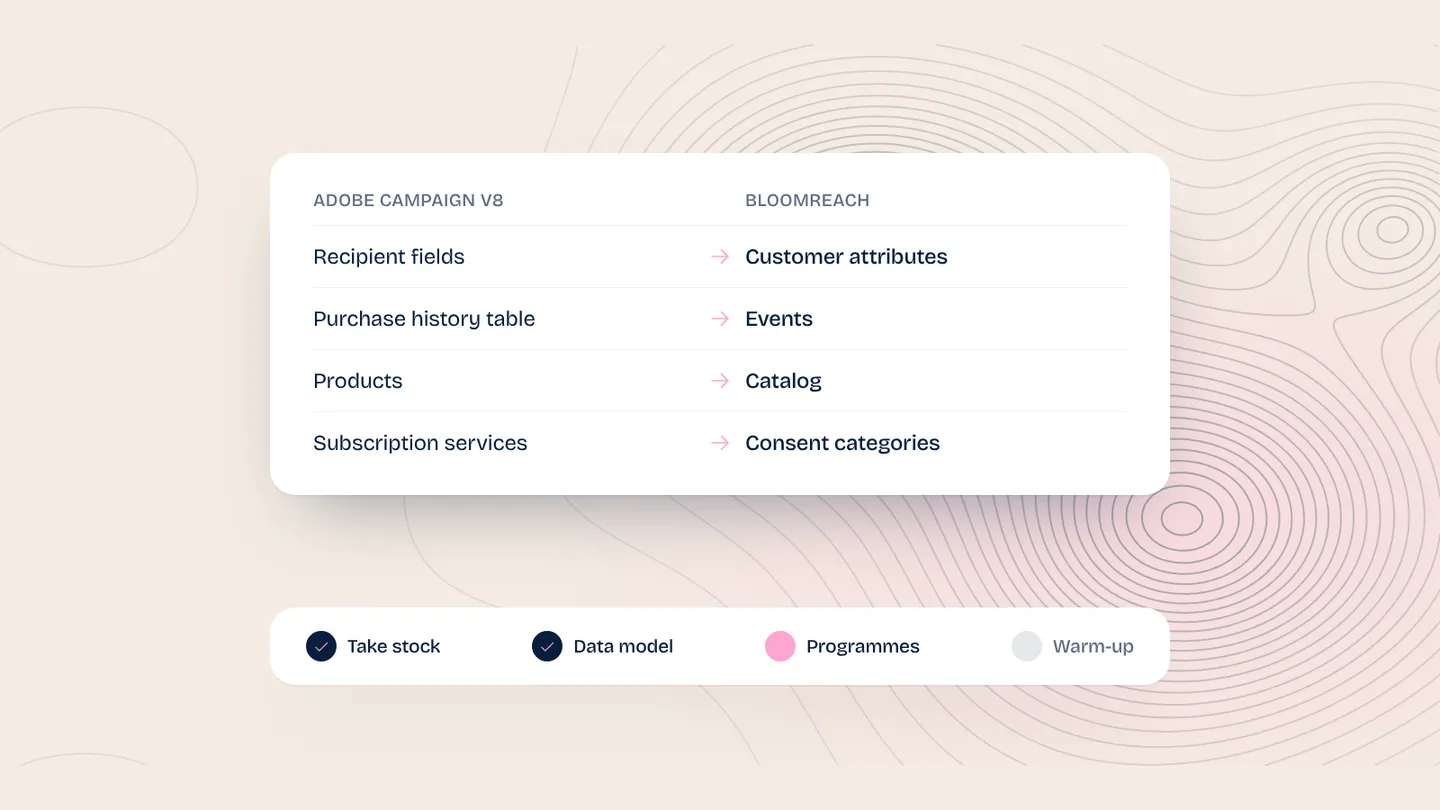
This is the step that decides whether the rest goes smoothly. For every table and field you keep, ask one question: in Bloomreach terms, is this a customer attribute, an event or a catalog?
- Customer attributes describe the person now: name, language, preferred store, loyalty tier.
- Events describe something that happened at a point in time: an order, a store visit, a form submission. Things you modelled as linked tables in Campaign, like purchase history, often become events.
- Catalogs hold reference data that many customers share: products, stores, articles.
A few practical points that matter here:
- Identifiers. Decide early which ID is the primary key for a customer and how web visitors become known customers. Getting identity wrong is the most painful mistake to fix later.
- Consent. Bloomreach models consent as categories with a granted or revoked state and a full history on the profile. Map your current subscription services and opt-in fields onto categories before you import anything, and agree the mapping with whoever owns privacy.
- Data feeds. If your source data already lives in a warehouse, Bloomreach can import directly from BigQuery, Snowflake, Databricks and PostgreSQL or Redshift through its Data hub warehouse imports. That is often cleaner than rebuilding file-based exports.
- History. Decide how much past engagement and order data you bring over. You need enough for segmentation and for the deliverability warm-up in step 4. You probably do not need ten years of delivery logs.
Step 3: rebuild programmes, not campaigns
With the data model in place, you rebuild the marketing logic. This is where the inventory from step 1 pays off.
Workflows become scenarios
A Campaign workflow that runs every night, queries recipients and sends a delivery can often become a much simpler scenario that reacts to an event in real time. An abandoned basket flow is the classic example: instead of a scheduled query, the scenario starts when the basket event arrives. Not every workflow translates this neatly, so review the logic rather than copying the steps.
Typology rules become frequency policies and consent
In Bloomreach, a frequency policy limits how many messages a customer receives within set time windows, across email, SMS, push and webhooks. Combined with consent categories, this covers most of what pressure and filtering rules did in Campaign. Write down your current rules in plain language first, then rebuild them. You will probably find a few that contradict each other.
Personalisation gets rewritten
Campaign personalisation fields and JavaScript do not carry over. Everything is rewritten in Jinja. This is a good moment to build a small library of reusable blocks for headers, footers, product grids and legal text, so your team stops copying them between templates.
You are not moving your old Campaign set-up to a new tool. You are building the set-up you would have built if you had started today.
Step 4: warm up, run in parallel, then switch
New sending infrastructure means new reputation with mailbox providers. Bloomreach’s own warm-up guidance recommends a gradual ramp when you start sending from a new IP address or domain, starting with new and active users and only then moving to passive and lapsed ones. It also starts with importing past engagement data, which is one reason the history decision in step 2 matters.
A sensible order of play:
- Set up domains and authentication well before the first send, together with your IT team.
- Warm up with your most engaged customers, ideally with real programmes like the welcome series or transactional-style messages.
- Run both platforms in parallel for a defined period. Campaign keeps sending to the audiences not yet moved, Bloomreach takes over programme by programme.
- Compare results between the old and new set-up: volumes, bounces, complaints, conversions. Investigate differences before you blame or praise the new tool.
- Switch off Campaign only when the last programme has moved and you have exported the history you need for reporting and audit.
Watch out for the systems that quietly depend on Campaign: a BI dashboard reading delivery logs, a customer service tool checking opt-out status, a nightly export to finance. They tend to surface the week after cut-over unless you list them in step 1.
Before you start
If you are weighing this move, a few things will make the project easier regardless of who helps you:
- Get a named owner on the business side, not only in IT or in the agency.
- Agree the data model on paper before anyone builds a scenario.
- Plan your contract dates so you are not paying for both platforms longer than the parallel run needs.
- Keep a short list of programmes that must work on day one, and accept that the rest can follow.
We work with both platforms as part of our marketing automation practice. If you want a second pair of eyes on your inventory or your migration plan, we are happy to talk it through.